Review Tablets Lenovo

Lenovo Idea Tab Tablet - Review and opinions

Price in usual range
See on Amazon
Price and availability checked on
8.2 Overall

Score

Screen and format 8.5/10
  • Resolution: 2560 × 1600 · QHD
  • Refresh rate: 90 Hz
  • Screen size: 11″
Daily fluidity 7.8/10
  • RAM: 8 GB
  • Storage: 128 GB
  • Chipset: MediaTek Dimensity 6300
Battery and charging 5.8/10
  • Connectivity: WiFi 5
Productivity and shared use 8.0/10
  • Tab Pen and folio case are included, with keyboard connector support
  • Quad Dolby Atmos speakers and 128GB storage suit study and home use
Customer reviews 8.2/10

Quick verdict

Is this a study tablet that can also handle everyday entertainment, or a media slate dressed up for work? The Lenovo Idea Tab makes a credible case for the first route: its 11-inch 2.5K screen runs at 90Hz, and the Tab Pen and folio case are included. That bundle is useful for notes and reading, but it does not make the tablet a laptop replacement; buyers who need sustained heavy gaming or a full desktop workflow should look elsewhere.

For students and home users who want a sharp screen, pen input and room for apps, this is a well-equipped everyday Android tablet. The 8GB RAM and 128GB storage support a more flexible setup than a bare-bones streaming slate, while Android 15 and the included case make it ready for study and sofa use. Its clearest limit is role: keyboard support is present, but the keyboard is not included, and the battery’s endurance is a less convincing part of the proposition.

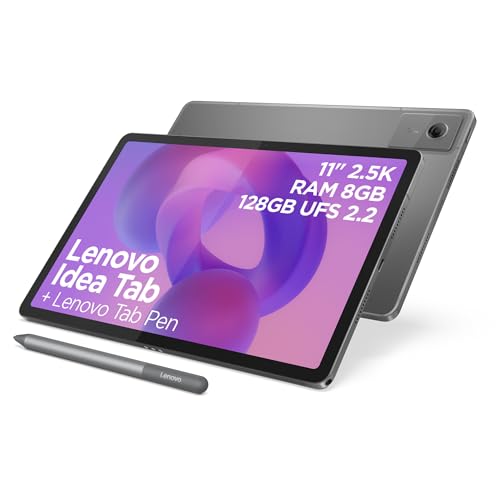
Screen size 11 inches
Resolution 2560x1600 pixels
Chipset MediaTek Dimensity 6300
RAM 8GB
Storage 128GB
Refresh rate 90Hz

A sharper, smoother reading screen

The 11-inch 2560x1600 display combines fine detail with a 90Hz refresh rate, making scrolling through articles and documents feel fluid while keeping the format manageable for sofa use.

It is a strong screen-led reason to choose this model, though the panel technology is not specified.

Pen included for study

The Tab Pen supports handwriting, image marking and Circle to Search, with notes and annotations suited to quick study sessions.

It adds value straight away; the folio case is included too, while a keyboard is only supported through the Pogo Pin connector and must be bought separately.

Everyday media, with a battery caveat

Quad Dolby Atmos speakers, a headphone jack and Android 15 cover common streaming and app use without extra audio equipment.

Battery life is mixed in practice, so this is a better fit for home, desk or shorter outings than for a full day of use far from a charger.

Performance and experience

For reading notes or watching a programme on the sofa, the 11-inch 2.5K display gives text and images plenty of detail without pushing the tablet into a particularly large format. Its resolution works out at roughly 275 pixels per inch, so small text should remain crisp at normal viewing distances; the 90Hz refresh rate also makes scrolling feel smoother than a standard 60Hz screen. The trade-off is that no weight figure is provided, so this is easier to place as a home-and-study tablet than as a travel-first choice.

At a desk, the included Tab Pen turns handwritten notes and quick annotations into a practical part of the setup rather than an extra purchase. Circle to Search and the writing tools add useful study functions, while 8GB RAM and 128GB storage give everyday apps and documents room to coexist. The folio keyboard connector offers another route for typing, but the keyboard itself is not in the box; anyone planning long essays or regular office work should budget for a separate keyboard and treat this as light productivity, not a laptop substitute.

For a film or video call at home, the quad Dolby Atmos speakers and headphone jack give you options for listening without relying on a separate speaker. The display and sound make streaming a natural use, but battery feedback is mixed, and the product description’s all-day claim is not enough to settle endurance for long days away from a charger. If you routinely study or stream for hours without access to power, battery life is the main compromise to weigh.

Pros

  • Sharp 11-inch 2.5K display with a 90Hz refresh rate
  • Tab Pen and folio case included
  • 8GB RAM and 128GB storage
  • Quad Dolby Atmos speakers and a headphone jack.

Cons

  • Battery life receives mixed feedback
  • Folio keyboard is not included
  • Intensive gaming is not its strongest use
  • Some office-app use on an 11-inch tablet may require a subscription.

Community

User reviews

The recurring appeal is straightforward setup, responsive everyday use, a vivid screen and useful included accessories. The practical caution is battery life: experiences vary, so frequent long sessions away from a charger are a less certain fit than home streaming or study.

James

★ ★ ★ ★ ★

I found the screen clear and vibrant, setup easy and the tablet responsive. The pen and folio case are useful, though I would not choose it for intensive games.

Simon

★ ★ ★ ★ ★

My wife and I replaced older tablets with these and enjoy the screen, speakers and Wi-Fi. The 11-inch size also means Microsoft Office apps require a subscription for the use I wanted.

Amy

★ ★ ★ ★ ★

I bought it for working from home and am happy with its speed, storage and sound. I also value having the pen and case included.

Peter

★ ★ ★ ★ ★

I use it daily for streaming, browsing, note-taking and light productivity, and the included pen and protective case add to its value.

Comparison

Attribute Lenovo Idea Tab Current TABWEE T60 Pro Freeski UKA10L02 TABWEE T90 Tablet Tabwee
Price £280.02 Out of stock Out of stock Out of stock
Screen size 11 inches 13.4 inches 10 inches 11 inches
Resolution 2560x1600 pixels 1920 x 1200 pixels 1280 x 800 pixels 1920x1200 pixels
Refresh rate 90Hz 120 Hz - -
RAM 8GB 24 GB 24 GB 24 GB
Storage 128GB 256 GB 64 GB 128 GB with up to 2 TB microSD expansion
Editorial score 8.2/10 7.0/10 5.6/10 7.2/10

Against the Lenovo Tab Plus, the Idea Tab’s known advantage is its 2560x1600 resolution and 90Hz screen, paired with an included pen and case. The Tab Plus has an 11.5-inch 2000x1200 display, 8GB RAM and 128GB storage; choose it if the larger screen matters more, and the Idea Tab if sharper detail and pen-led study are the priority.

The Samsung Tab A9+ offers an 11-inch 1920x1200 display with 8GB RAM and 128GB storage, making it a straightforward alternative for general tablet use. The Idea Tab raises the resolution to 2560x1600, refreshes at 90Hz and includes a pen and folio case, so it suits buyers who value screen detail and note-taking. For a larger display and a different chipset route, the Xiaomi Redmi Pad 2 Pro has a 12.1-inch 2560x1600 screen and Snapdragon 7s Gen 4, but its listed RAM is 6GB; choose between screen area and the Idea Tab’s included study accessories.

Compare with Compare this model This product stays fixed; add a recommended alternative or search another model in the category.

Compare with

Add a second model to activate the direct comparison.

Is the Lenovo Idea Tab tablet worth it?

The Lenovo Idea Tab is an appealing study-and-entertainment tablet for buyers who want a detailed 90Hz screen, pen input and a protective case without assembling the basics separately. Check the current offer against alternatives, particularly if the included accessories are a major part of the value. Skip it if your priority is intensive gaming, long stretches away from a charger or laptop-style typing without extra purchases. Its strongest case is everyday reading, streaming and note-taking; for heavier work, choose a more clearly productivity-focused device.

See the best price on Amazon Check for today's deals. Free delivery with Prime.

FAQ

Is the keyboard included?

No. The folio case and Tab Pen are included, while the tablet supports a Pogo Pin keyboard connector.

Is it suited to a full day of study away from power?

Battery feedback is mixed, so it is a safer choice for sessions with charging access than for a long day away from a charger.

Editorial team

DigitalCritic editorial team

The DigitalCritic editorial team reviews product specs, prices, availability, visible customer feedback, and buying signals to keep reviews useful and up to date.

Review published on