
Ranking medal
Gold in Best value
This product is top 1 in a published dynamic ranking.
Ranking medal
This product is top 1 in a published dynamic ranking.
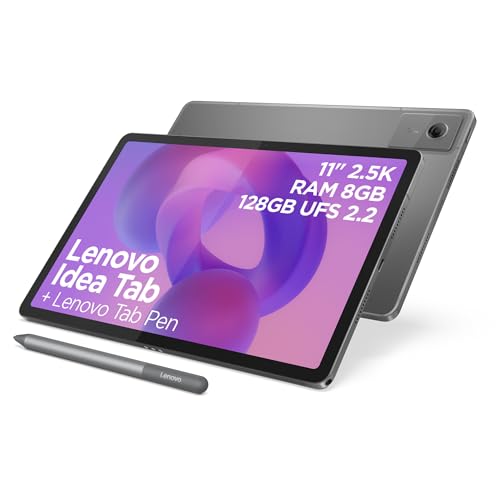
If you want a study-friendly Android tablet with a sharp 11-inch 2.5K screen, pen input included and enough storage for everyday work, the Lenovo Idea Tab lands in a very sensible middle ground. Its appeal is obvious for reading, note-taking, streaming and light family use, but the real question is whether the MediaTek Dimensity 6300, 8 GB of RAM and 128 GB of storage give you enough headroom for more than the basics without feeling cramped later.
This is the sort of tablet to buy when display quality, stylus support and easy day-to-day use matter more than chasing laptop-style ambition. Skip it if you want a premium productivity slate with clear high-end performance or if you are sensitive to software polish, because the strongest case here is comfort and value rather than outright speed or a desktop-like experience.
| Screen size | 11 Inches |
|---|---|
| Resolution | 2560x1600 Pixels |
| Chipset | MediaTek Dimensity 6300 |
| RAM | 8 GB |
| Storage | 128 GB |
| Refresh rate | 90 Hz |
The 2560x1600 panel gives this tablet a clear edge for reading, video and handwritten notes. The 90 Hz refresh rate makes movement feel cleaner when you scroll or annotate, so the screen does more than look good on a spec line.
For a buyer, that means less eye strain in long sessions and a better feel for pen use. The practical caveat is simple: this is a comfort-first display, not a route into premium-class performance or OLED contrast.
The Tab Pen is included, and that changes the purchase from a bare tablet into a more complete study or family setup. It is the difference between a device that can support note-taking and one that is ready for it straight away.
That makes the Idea Tab easier to recommend for schoolwork, annotations and casual drawing. The trade-off is that the pen helps most when your workload is light to moderate; it does not turn the tablet into a laptop replacement.
The Dimensity 6300, 8 GB of RAM and 128 GB of storage put this tablet in the sensible everyday lane. It is built for browsing, reading, streaming and app switching rather than heavy creative work.
In practice, that is enough for a child’s tablet, a student’s note pad or a household media device. The limitation is headroom: if you keep many apps open or want a more forceful response under pressure, this is not the strongest route in the class.
For reading, streaming and sofa use, the first thing that matters is the screen, and this one has the right shape for the job. An 11-inch panel at 2560x1600 gives a dense, sharp image, and the 16:10 format suits books, web pages and video without feeling awkward in the hand. The 90 Hz refresh rate adds a smoother glide when scrolling through documents or switching between apps, which is exactly the sort of comfort that makes a tablet feel pleasant rather than merely acceptable.
The study angle is stronger than the raw spec list suggests because the pen is part of the package and the reviews consistently lean towards note-taking, drawing and quick setup. That matters more than a generic stylus mention, because included accessories change the buying decision from “tablet plus extras” to “ready to use out of the box”. The trade-off is that this still reads as a light productivity device, not a full work machine; the 8 GB memory and mid-range chipset are enough for browsing, reading and messaging together, but not the route for buyers who expect heavy multitasking to feel effortless all day.
Battery life and portability round out the picture. The tablet is being bought and used as a daily companion, and the recurring theme is that it lasts well enough for classes, children’s use and car journeys, which is the right kind of endurance for a home-and-travel slate. The limitation is not battery anxiety so much as confidence in the whole package: this is a practical tablet for everyday routines, but if your use case depends on consistently fast, polished performance under load, the value story weakens quickly.
Community
The broad pattern is straightforward: people are most convinced by the screen, the pen and the easy everyday feel, while the main hesitation sits around performance polish. That makes the tablet a strong fit for study and family use, but a weaker choice for anyone who wants a more aggressive productivity machine.
Kids love it. The pen is very convenient. Good speed, screen and enough storage for daily use.
Excellent. Set up in 10 minutes. Just what I wanted.
I bought this as a mid-range Android device for study, media consumption and light productivity, and it strikes a careful balance between capability and cost.
Excellent tablet, sound good. Debloating takes a few minutes, very good. One of the best designs and specs, but the UI is not great.
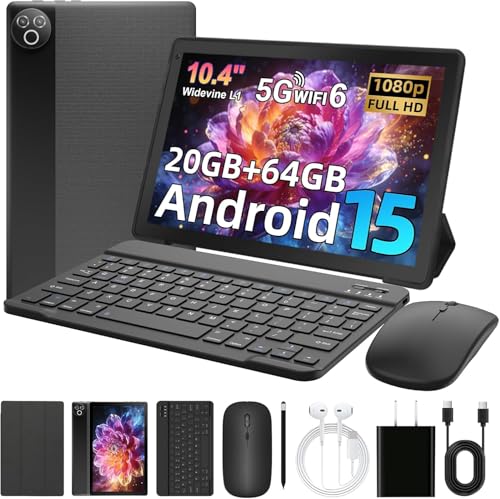
| Attribute | Lenovo Idea Tab 11" 2.5K Current | Lenovo Idea Tab | MUISOO Android 15 Tablet 10.4 inch | Freeski UKA10L02 |
|---|---|---|---|---|
| Price | £246.30 | £285.02 | Out of stock | Out of stock |
| Screen size | 11 Inches | 11 inches | 10.4 inch | 10 inches |
| Resolution | 2560x1600 Pixels | 2560x1600 pixels | 800 x 1332 pixels | 1280 x 800 pixels |
| Refresh rate | 90 Hz | 90Hz | - | - |
| RAM | 8 GB | 8GB | 20 GB | 24 GB |
| Storage | 128 GB | 128GB | 64 GB | 64 GB |
| Chipset | MediaTek Dimensity 6300 | - | Penta-core processor up to 1.8 GHz | Penta-Core processor up to 2.0 GHz |
| Editorial score | 8.4/10 | 8.2/10 | 6.2/10 | 5.6/10 |
Against the TABWEE T90, the Lenovo looks like the more polished study-and-media route if you value the sharper 2.5K screen and included pen over raw memory numbers. The TABWEE has the bigger RAM headline, but Lenovo’s stronger display and clearer everyday tablet identity make more sense for reading, note-taking and family use.
Compared with the Samsung Galaxy Tab A11, this Lenovo sits in the more spacious 11-inch, higher-resolution lane, which matters if your priority is screen comfort rather than a smaller, cheaper slate. The Samsung route makes more sense if compactness and a lighter footprint matter more; this Lenovo is the better call when you want a roomier display for schoolwork and streaming.
The SVITOO P11 is the obvious alternative if you are chasing a budget big-screen tablet and are less concerned about display sharpness. Lenovo wins on screen quality and the more complete pen-led experience, while the SVITOO-style route suits buyers who only need a basic large tablet for casual use.
Compare with
Add a second model to activate the direct comparison.


No products match that filter combination.
The Lenovo Idea Tab makes the most sense for buyers who want a good-looking, pen-ready Android tablet for reading, note-taking, streaming and family use. The 11-inch 2.5K screen, 90 Hz refresh rate and included Tab Pen give it a clear everyday advantage, and the 8 GB / 128 GB configuration is sensible for the price lane it sits in. If you are checking the current offer, the value case is strongest when you want a complete tablet setup rather than a bare slate plus accessories. The reason to skip it is equally clear. If your tablet use leans towards heavier multitasking, more polished software behaviour or a machine that can stand in for a laptop more often, this is not the cleanest route. The limitation is not one dramatic flaw but a ceiling on ambition, and that matters most for buyers who want more than a comfortable study or media companion.
It works best as a study-and-media tablet, with the pen and sharp 11-inch screen doing the heavy lifting for notes, reading and streaming.
No, not comfortably. It is best treated as a capable tablet for light productivity, not a full desktop-style work machine.
Review published on
