Ranking medal
Silver in Best for a specific profile for kids tablets
This product is top 2 in a published dynamic ranking.
Ranking medal
This product is top 2 in a published dynamic ranking.
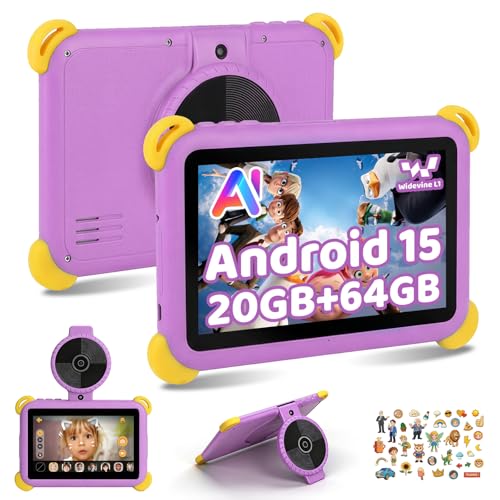
The Ainmel KB08BU is aimed squarely at parents who want a first tablet for a child rather than a mini productivity device for schoolwork. Its appeal is easy to see: a 7-inch size that suits small hands, parental controls, a protective case in the box, expandable storage, and a feature set built around learning apps, videos and simple games. The clearest trade-off is screen quality versus price, because this is a compact budget kids tablet with a 1024 x 600 display, not a sharper all-round family slate.
I’d buy this for a child aged roughly 3 to 7 who mainly needs YouTube Kids, stories, beginner learning apps and a tablet that can survive everyday handling a bit better than a standard slab. I’d skip it if you want one device to double as a serious study tablet, a travel cinema screen, or a clearly premium display experience. Its strength is family-friendly convenience, and its weakness is that the screen and overall spec balance are tuned for value, not polish.
| Screen size | 7 Inches |
|---|---|
| Resolution | 1024 x 600 |
| Chipset | BESIDES, with built-in AI characters |
| RAM | 20 GB |
| Storage | 64 GB |
| Operating system | Android 15 |
The 7-inch size, over-3s positioning and included protective case give this tablet a clear role in the home.
It is easier to hand to a toddler or young child than a larger 10-inch model, and the case adds the kind of grip and drop protection that matters more than slimness here. That makes it a better fit for playrooms, travel and supervised screen time than for older children who need more room for reading, split-screen work or school tasks.
This is not just a standard Android tablet with a bright case. The parental control tools, child-oriented apps and learning focus change the buying decision because they cut down setup friction for parents and make the tablet easier to keep inside age-appropriate limits.
If your priority is safe entertainment with some educational value, that matters more than raw speed. If your priority is open Android flexibility for an older child, the same child-first setup can feel restrictive.
The practical win here is not the marketing-style RAM headline on its own, but the overall room for family use. With 64 GB built in and support for microSD cards up to 1 TB, there is far more space for offline videos, games and photos than many cheap kids tablets offer.
For a shared household device, that reduces the need to constantly delete apps and downloads. Just remember that storage expansion helps capacity, not screen quality or high-end gaming power.
WiFi 6, Bluetooth 5.3 and Widevine L1 are unusually useful inclusions at this end of the market.
They make the tablet easier to place in a modern home where streaming, wireless headphones and quick app downloads are part of everyday use. The catch is that the display itself remains entry-level, so HD streaming support is welcome but it cannot fully disguise the modest 1024 x 600 panel.
In a back-seat car journey or on the sofa after nursery, this tablet makes the most sense when the job is simple entertainment with guard rails. The 7-inch format is easy for little hands to hold, and the bundled protective case matters as much as the tablet itself because it turns a basic Android slate into something more realistic for family life. For YouTube Kids, stories and simple games, the compact size is a strength. The compromise is viewing comfort for adults: 7 inches is practical for a child, but cramped if you were hoping to share films or browse for long stretches yourself.
Once apps are installed and a few tabs or videos are in rotation, the headline memory setup gives this tablet enough breathing room for light family use, but it is worth reading that claim properly. The advertised 20 GB RAM includes 3 GB physical memory plus expansion, paired with 64 GB storage and microSD support up to 1 TB. That is useful for downloaded cartoons, photos and children’s apps, and it reduces the usual storage squeeze that cheap kids tablets suffer from. It does not turn this into a high-performance gaming tablet, but it does make everyday switching between child-friendly tasks feel more comfortable than the price tier usually suggests.
Screen sharpness is where the budget lane shows most clearly. On a 7-inch panel, 1024 x 600 works out at roughly 170 ppi, which is fine for cartoons, large icons and simple educational apps, but it is not a crisp reading or film screen by modern tablet standards. The upside is that the IPS panel and Widevine L1 support make streaming services more practical than on many ultra-cheap children’s tablets. The downside is equally clear: if you are fussy about text clarity or want a noticeably richer picture, this is the point where you move upmarket.
The family-use details are the reason this model is easier to recommend than a generic low-cost tablet with a cartoon case. Android 15, parental controls, WiFi 6, Bluetooth 5.3 and the child-focused software package all push it towards a straightforward setup for supervised use. The dual 5 MP cameras and AI play features add novelty for younger children, especially for playful photos and simple creative use, but they are extras rather than the main reason to buy. The more important day-to-day result is that this feels built around quick setup, safe use and enough durability signals to cope with drops and daily handling.
Community
The recurring pattern is simple: families like the size, the case, the easy setup and the fact that children take to it quickly. The main note of caution is also consistent with the hardware route, because battery life is good rather than exceptional and the screen is acceptable for the money rather than a standout.
I’m glad I bought this for my child because it feels handy, the protective case is sturdy, it connects easily and runs smoothly with enough memory for apps and games plus parental control.
I like that Android 15 feels modern and smooth, the storage setup gives loads of room, the parental controls were easy to set up and the protective case has already handled a few drops.
It works well for YouTube Kids and simple games, the case is useful and sturdy, and while the screen is not amazing, it is fine for the price and my child is happy with it.
I bought it for my toddler, found it simple to use with fast charging, and the AI conversations have been the feature my daughter enjoys most.
| Attribute | Ainmel KB08BU Current | Ainmel KB08PP | Ainmel KB08GN | Amazon Fire 7 Kids |
|---|---|---|---|---|
| Price | £59.98 | £67.99 | Out of stock | Out of stock |
| Screen size | 7 Inches | 7 Inches | 7 Inches | 7" |
| Resolution | 1024 x 600 | 1024 x 600 | 1024 x 600 | - |
| RAM | 20 GB | 20 GB | 20 GB | 2 GB |
| Storage | 64 GB | 1 TB | 1 TB | 32 GB |
| Chipset | BESIDES, with built-in AI characters | - | - | quad-core processor |
| Operating system | Android 15 | Android 15 | Android 15 | - |
| Editorial score | 6.9/10 | 6.8/10 | 6.6/10 | 6.8/10 |
Against larger budget tablets such as the Freeski UKA10L02 and MUISOO MSOKB1001, the Ainmel takes the more child-specific route. Those alternatives give you a 10-inch-plus screen and 1280 x 800 resolution, so they make more sense for older children, shared family streaming or basic school tasks where extra display area matters. The Ainmel wins when small hands, parental controls, portability and a protective case are the priority rather than screen space.
The Whitedeer G13 pushes even further towards a general family tablet with its 10.1-inch 1280 x 800 display, octa-core processor and 30 GB RAM claim. Choose that kind of model if you want more room for browsing, films and broader household use. Choose the Ainmel KB08BU if the purchase is really about a younger child’s first tablet, where compact size, easy handling and a child-focused setup matter more than chasing bigger-screen specs.
Compare with
Add a second model to activate the direct comparison.
No products match that filter combination.
The Ainmel KB08BU gets the basics right for its intended job. It is compact, child-friendly, easier to protect than a standard tablet, and much more convincing as a first kids device than a generic budget Android slate dressed up with bright colours. If the current offer keeps it in the affordable end of the market, the mix of parental controls, expandable storage, decent day-to-day smoothness and family-ready design makes sense.
The skip case is just as clear. If you want a sharper screen, a bigger panel for travel films, or a tablet that can grow into schoolwork and light productivity, this is too small and too entry-level to stretch that far. For younger children and straightforward home use it is well judged, but for older kids or adults there are clearer large-screen alternatives.
It is mainly a kids and family tablet for videos, simple games, learning apps and supervised use, not a serious study or note-taking device.
Yes for cartoons, YouTube Kids and casual viewing, especially with Widevine L1 support, but the 1024 x 600 panel is still a budget display and not the reason to buy it.