
ACEMAGIC AX15 Laptop - Review and opinions
Quick verdict
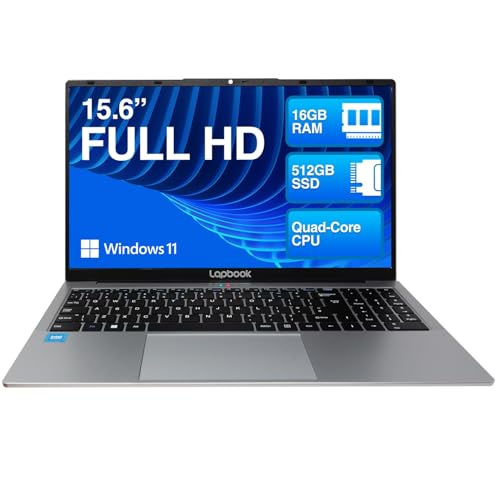
The ACEMAGIC AX15 is aimed at the budget-conscious home, study, and light office crowd who want a full-size 15.6-inch Windows laptop with 16GB RAM and a 512GB SSD rather than a stripped-back bargain machine. Its appeal is straightforward: plenty of everyday memory and storage, a Full HD screen, and useful ports in a chassis that is light enough to move around the house or carry to class. The trade-off is just as clear: this is a value-led machine for documents, browsing, streaming, and routine admin, not a laptop to buy for demanding creative workloads or long, worry-free unplugged days.
I’d buy the AX15 if your routine is email, web tabs, Office work, video calls, streaming, and general household computing, and you want those basics to feel quick without paying mainstream-brand money. I’d skip it if you need a clearly premium keyboard layout for UK typing, stronger long-term confidence, or a laptop chosen around heavy editing and sustained performance. The AX15 makes the most sense when value and usable day-to-day spec matter more than polish.
| Screen size | 15.6 Inches |
|---|---|
| Resolution | 1920 x 1080 pixels |
| Processor | N150 Processor up to 3.6GHz |
| RAM | 16 GB |
| Storage | 512 GB SSD |
| Wireless connectivity | WiFi 5 and Bluetooth 5.0 |
| Ports | 3*USB3.2 |
Everyday multitasking
The strongest practical feature here is not glamour but balance. A 16GB memory configuration paired with a 512GB SSD gives the AX15 enough room for normal Windows use to stay responsive, especially for home admin, study, browser-heavy work, and media playback.
That matters because many low-cost laptops cut RAM first. Here, the trade-off shifts away from waiting on simple tasks and towards accepting a more modest processor class for heavier work.
Desk-friendly screen and size
A 15.6-inch 1920 x 1080 display is the right kind of spec for buyers who want a main household laptop rather than a tiny secondary machine. You get enough workspace for writing, browsing, and video without the softness that still drags down some cheaper large-screen laptops.
The benefit is comfort over long sessions. The caveat is that screen quality is described positively for clarity, not as a premium panel for creators.
Useful connectivity without dongle drama
The AX15 is built around practical ports, including USB, HDMI, Type-C data, and a 3.5mm headphone jack, alongside WiFi 5 and Bluetooth 5.0.
For a budget laptop, that is a meaningful convenience win because it supports the ordinary accessories people still use every day. If your routine includes a mouse, USB stick, headset, and occasional monitor connection, this layout is much easier to live with than thinner machines that push everything through one adapter.
Performance and experience
Starting a workday on the AX15 is about getting to a usable desktop quickly and having enough headroom for normal multitasking. With 16GB RAM and a 512GB SSD, this machine sits in the comfortable lane for browser tabs, documents, email, and messaging at the same time, and that matters more here than headline processor glamour. For admin work, study, and household tasks, the setup feels closer to a proper everyday laptop than to an ultra-cheap stopgap.
Once it is on the desk, the 15.6-inch Full HD panel gives you the kind of space that suits spreadsheets, side-by-side documents, and long reading sessions better than a cramped smaller screen. At roughly 141 pixels per inch, text and interface elements land in a sensible zone for day-to-day viewing, and the slim-bezel design helps the machine feel more modern than its price-led positioning suggests. The compromise is that this is still a basic LCD laptop screen rather than a display-first machine for colour-critical work.
For calls and media, the practical package is decent. There is an integrated webcam, audio recording support, and dual speakers, so the AX15 covers the essentials for online classes, remote meetings, and casual streaming without needing immediate accessories. Port choice also helps daily use: the machine is described with multiple USB ports, HDMI, a headphone jack, and Type-C data, which makes it easier to plug in a mouse, storage, or an external display without living on adapters.
Mobility is where the AX15 stays sensible rather than exceptional. At a price band around 5 GBP and 0.66 inches thick, it is portable enough for commuting between rooms, campus, or office, and the manufacturer positions it around up to eight hours of battery life. In real buying terms, that means a laptop you can carry and use away from the plug for part of the day, but not one I would choose if all-day battery endurance is the main reason you are shopping. The other daily friction point is the keyboard route, because UK buyers may receive an American layout and need the included cover or a period of adjustment.
Pros
- 16GB RAM and 512GB SSD make it stronger than many budget laptops for everyday multitasking
- 15.6-inch Full HD screen is a sensible fit for work, study, and streaming
- Good spread of practical connectivity including USB, HDMI, Type-C, WiFi 5, and Bluetooth 5.0
- Strong value reputation for buyers who want a full-size Windows laptop without paying for a bigger brand.
Cons
- US keyboard layout can be an annoyance for UK buyers even if a cover is included
- Battery expectations need to stay moderate rather than ambitious
- Not the right choice for demanding creative work or performance-led workloads
- Long-term reliability confidence is softened by a small number of serious failure complaints.
Community
User reviews
Buyer feedback around the AX15 lands in a familiar pattern for a value laptop: people are happy with the speed, screen clarity, and price-to-spec balance, while the main frustrations centre on battery consistency, the US keyboard layout, and a few more worrying reliability complaints. The practical lesson is simple: it works best as an affordable everyday machine, not as a purchase made purely on long-term peace of mind.
I bought it because the spec looked strong for the money, and it has been quick, easy to set up, and good enough for everything I need day to day.
Mine arrived with an American keyboard and the instructions were very minimal, but once I got going it felt light, quick, and good value, and customer service replied helpfully on WhatsApp.
It looks good, does everything we want, and felt like excellent value, but the US keyboard caught me out at first until I realised there was a cover in the box.
My experience was the opposite, with the screen failing after about 18 months and no useful follow-up when I tried to get help.
Comparison
| Attribute | ACEMAGIC AX15 Current | ACEMAGIC LX15PRO | Lenovo IdeaPad 1 15AMN7 | Acer Aspire Go AG15-42P |
|---|---|---|---|---|
| Price | Out of stock | Out of stock | £619.99 | £629.99 |
| Screen size | 15.6 Inches | 15.6 inches | 15.6 Inches | 15.6 Inches |
| Resolution | 1920 x 1080 pixels | 1920 x 1200 | 1920 x 1080 pixels | 1920 x 1080 pixels |
| Processor | N150 Processor up to 3.6GHz | AMD Ryzen 7 5700U | Ryzen 5 7520U | AMD Ryzen 5 5625U |
| RAM | 16 GB | 16GB DDR4 | 16 GB | 16 GB |
| Storage | 512 GB SSD | 512GB M.2 NVMe SSD | 512 GB | 512 GB |
| Editorial score | 6.9/10 | 6.9/10 | 7.3/10 | 7.4/10 |
Against a typical budget Chromebook, the AX15 makes more sense if you want full Windows software, local storage, and a more flexible port mix for home office use. Choose the Chromebook route instead if your life is mostly browser-based and you care more about simplicity, security, and battery efficiency than local Windows apps.
Against entry-level mainstream 15-inch Windows laptops from families such as Acer Aspire, ASUS VivoBook, or Lenovo IdeaPad, the AX15 stands out by pushing RAM and SSD capacity aggressively for the money. Those better-known alternatives are the safer route if you put more weight on keyboard localisation, support structure, and long-term brand confidence. The AX15 is the sharper value play when everyday responsiveness matters more than badge reassurance.
Compare with Compare this model This product stays fixed; add a recommended alternative or search another model in the category.
Compare with
Add a second model to activate the direct comparison.
Recommended models




No products match that filter combination.
Is the ACEMAGIC AX15 laptop worth it?
The ACEMAGIC AX15 is at its best when judged as a value-first mainstream laptop for everyday Windows use. It gives you the right basics in the right places: a 15.6-inch Full HD display, 16GB RAM, 512GB SSD, integrated webcam, and enough connectivity to work without constant compromises. If the current offer is competitive, that combination is easy to understand.
FAQ
Is the ACEMAGIC AX15 good for students and home office work?
Yes. Its 15.6-inch Full HD screen, 16GB RAM, 512GB SSD, webcam, and practical ports suit documents, browsing, online classes, and routine office tasks well.
What is the main drawback to know before buying?
The biggest day-to-day issue is the keyboard and ownership experience rather than raw speed, because some UK buyers receive a US layout and battery life is not consistently praised.
Review published on