Review Laptops Lapbook

Lapbook S15 N2 Intel 13th Gen Laptop - Review and opinions

Lapbook S15 N2 Intel 13th Gen
8.2 Overall

Quick recommendation

Value for money 8.6/10
Ease of use 8.3/10
Durability 7.1/10
Customer reviews 8.8/10

Is it worth it?

The Lapbook S15 N2 is aimed squarely at people who want a sensibly priced 15.6-inch Windows laptop for study, office work, web use and streaming, without dropping to 8GB RAM or tiny storage. Its appeal is easy to understand: Full HD display, 16GB RAM, 512GB SSD, a numeric keypad and a generous spread of ports in a light chassis. The trade-off is just as clear: this is a value-focused everyday machine, not a laptop for demanding gaming, heavy creative workloads or buyers who want a more clearly premium input and audio experience.

My quick verdict is that this is a strong fit for mainstream home use, schoolwork, admin-heavy tasks and portable desk work, especially if you value easy setup and practical connectivity. I would skip it if your purchase depends on higher-end processing, stronger speakers, or a more polished touchpad and charging arrangement. For basic to moderate workloads, though, the configuration is better judged as a usable daily tool than as a stripped-back budget compromise.

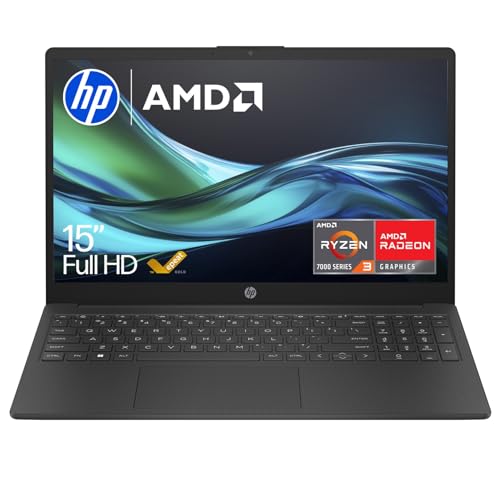
Screen size 15.6 Inches
Resolution 1920 x 1080 pixels
Processor Intel N5100 Quad-Core CPU
RAM 16 GB DDR4
Storage 512 GB M.2 SSD
Ports USB 3.0, USB 2.0, HDMI, USB Type-C, RJ45, Kensington Lock

Key features

Display and desk comfort

The 15.6-inch IPS screen and Full HD resolution are the right combination for general-purpose work. Text, streaming video and everyday browsing all benefit from the extra sharpness over older low-resolution budget panels.

The practical effect is simple: it is easier to spend longer sessions reading, writing and managing multiple windows. If your priority is comfort for office tasks rather than colour-critical creative work, this screen size and resolution make sense.

Performance for normal workloads

The useful part of the configuration is not just the processor, but the pairing of 16GB DDR4 memory with a 512GB M.2 SSD. That gives the laptop room for multitasking, faster restarts and enough local storage for documents, media and a decent spread of everyday apps.

Where it stops is equally important. This is a machine for mainstream Windows use, not a shortcut to gaming-laptop performance or workstation-class editing.

Ports that reduce dongle dependence

This laptop covers more real-world connections than many similarly positioned slim machines, including USB-A, USB-C, HDMI and RJ45 Ethernet. There is also a TF or SD-style card slot mentioned in the product description, which adds convenience for moving files without reaching for an adapter.

For a home office or study setup, that matters more than flashy branding. You can connect a monitor, wired network and common accessories without building your whole desk around extra hubs.

Setup and day-one usability

Windows 11 Home comes pre-installed, and this matters because the first-hour experience is part of the product’s value. A laptop aimed at casual buyers has to get out of the way quickly, and this one is built around that straightforward route.

That ease comes with one small reality of budget Windows laptops: the software side may still need the usual updates and a little tidying before it feels fully settled.

User experience

From the first workday start, this laptop makes most sense with a browser, email, documents and messaging open together. The 16GB RAM and 512GB M.2 SSD shift it away from the cramped feel that cheaper entry laptops often have, and the Full HD resolution on a 15.6-inch panel works out at roughly 141 pixels per inch, which is a comfortable density for spreadsheets, web pages and text without looking coarse at normal desk distance. Boot-up and app loading are part of the appeal here, so the machine suits people who want to open the lid and get on with routine tasks rather than wait around for a hard drive-era experience.

Once you settle into writing and viewing, the shape of the machine becomes clearer. The full-size layout with dedicated numpad is genuinely useful for accounts, data entry and Excel-style work, and the screen’s 1920 x 1080 resolution gives enough room for side-by-side windows in a way that still feels practical on a 15.6-inch panel. The trade-off is input finesse rather than layout: this is not the kind of laptop I’d choose purely for luxurious keyboard feel or the most precise touchpad behaviour, and if you are sensitive to springy keys or a very responsive trackpad, that will matter more to you than the raw specification.

For calls and media, the built-in 2MP webcam, microphones, dual-band WiFi and HDMI output cover the basics well enough for hybrid home use. Video meetings, streaming and casual evening viewing fit the machine better than content creation or entertainment that depends on rich speakers and graphics headroom. The useful part is flexibility: USB-C can handle charging and external display duties, there is also Ethernet for a steadier desk setup, and the port mix is broader than many slim budget laptops. The compromise is that the USB-C charging route can become awkward if you want that same connection free at the same time.

Mobility is where the S15 N2 earns a lot of its goodwill. A 15.6-inch laptop with a light build, slim profile and full keyboard can slot into a commute, a shared kitchen table or a student bag more easily than bulkier budget machines. Battery expectations should stay in the everyday lane rather than the all-day ultrabook lane, but for moving between rooms, classes or meetings it avoids feeling like a desktop replacement in disguise. That makes it a good match for buyers who want one machine for home and occasional travel, but not for anyone whose whole day depends on long unplugged sessions.

Pros

  • 16GB RAM and 512GB SSD make everyday Windows use feel less cramped than many budget laptops
  • Full HD 15.6-inch display gives comfortable space for work, browsing and streaming
  • Strong port selection includes HDMI, USB-C and Ethernet
  • Light design and easy setup suit study, home office and portable use.

Cons

  • USB-C charging can be inconvenient when you also want that port free for accessories or display output
  • Touchpad sensitivity may take adjustment if you prefer more defined click control
  • Speakers are not a highlight for film or music without external audio
  • Not the right buy for gaming or heavier creator workloads.

Community

User reviews

The recurring takeaway is that this laptop wins people over by being easier, lighter and faster in everyday use than its modest positioning suggests. The main disappointments are small rather than fatal, with touchpad behaviour, speaker quality and the charging lead arrangement standing out more than any core failure in screen, setup or basic performance.

Clive

I bought the 16GB version for office work, browsing and streaming, and it has been plenty fast for that kind of use. Boot-up feels very quick, setup was easy, the screen is better than I expected and the main.

Amazon

I have been using it for a few months and it has felt fast, lightweight and reliable for browsing, streaming and running several programs at once. The screen is bright and clear, battery life has covered most of my.

Frambo

I like the metallic finish, the clear screen and the good spread of ports, and I was pleased that this version has a UK keyboard. My main gripe is that the touchpad is very sensitive and I would have preferred.

Terence

I replaced an old ThinkPad with this and was struck by how light it is and how quickly it boots. The colours are good, the screen is crystal clear and getting my details installed was straightforward, though I could.

Comparison

Against a better-specified route such as the ASUS Vivobook M1502YA, the key difference is ambition. The ASUS option brings a Ryzen 7 processor with the same 15.6-inch Full HD format and 16GB RAM, so it is the stronger choice for buyers who run heavier multitasking, more demanding software or simply want more headroom over time. The Lapbook fights back on affordability and straightforward everyday fit, so it makes more sense when your routine is documents, browser tabs, video calls and streaming rather than sustained compute-heavy work.

Compared with many entry-level 15.6-inch Windows laptops that still lean on 8GB RAM or slower-feeling storage, the S15 N2 is easier to recommend for mainstream home and study use because the memory and SSD configuration remove two common frustrations. It is also more practical than ultra-minimal slim laptops if you still care about Ethernet, HDMI and a numpad. Choose this Lapbook if you want a sensible all-rounder with fewer dongles and a lower spend; choose a more premium mainstream model if keyboard feel, speakers, battery stamina and higher processor confidence matter more than value.

Conclusion and verdict

The Lapbook S15 N2 gets the important basics right for a mainstream Windows laptop. It offers a useful amount of memory and storage, a sharp 15.6-inch screen, practical ports and a setup experience that does not ask much of the buyer. If you want one machine for school, admin, browsing, streaming and light home-office duty, this is the kind of configuration that can feel like a smart buy when the current offer is competitive.

I would pass if you want a laptop that feels premium in every interaction or if your workload depends on stronger processing and cleaner peripheral flexibility. The charging-through-USB-C arrangement and modest audio/input polish are the real compromises here. Stay within its lane, though, and it is an easy laptop to like.

FAQ

Is this laptop good for students or home office work?

Yes. The 15.6-inch Full HD screen, 16GB RAM, 512GB SSD, Windows 11 Home and numeric keypad make it well suited to documents, research, web use, video calls and general coursework.

Is it a good choice for gaming or demanding creative software?

No. It is better treated as an everyday productivity and media laptop, with integrated graphics and entry-level processor performance that suit routine tasks far better than serious gaming or heavy editing.

Alexandre Lefèvre

About the author

Alexandre Lefèvre

Tech enthusiast focused on testing and reviewing the latest devices. I share honest insights to help you choose the right products with confidence.